上一篇笔记整理了Paint.Net的基本结构. 这一篇整理一下Paint.Net中的Tool工具是如何对图形进行操作的.
首先是有一个toolsForm的悬浮窗1
2
3
4
5internal class ToolsForm
: FloatingToolForm
{
private ToolsControl toolsControl = null;
}
在Paint.Net中窗口的继承结构如下图所示: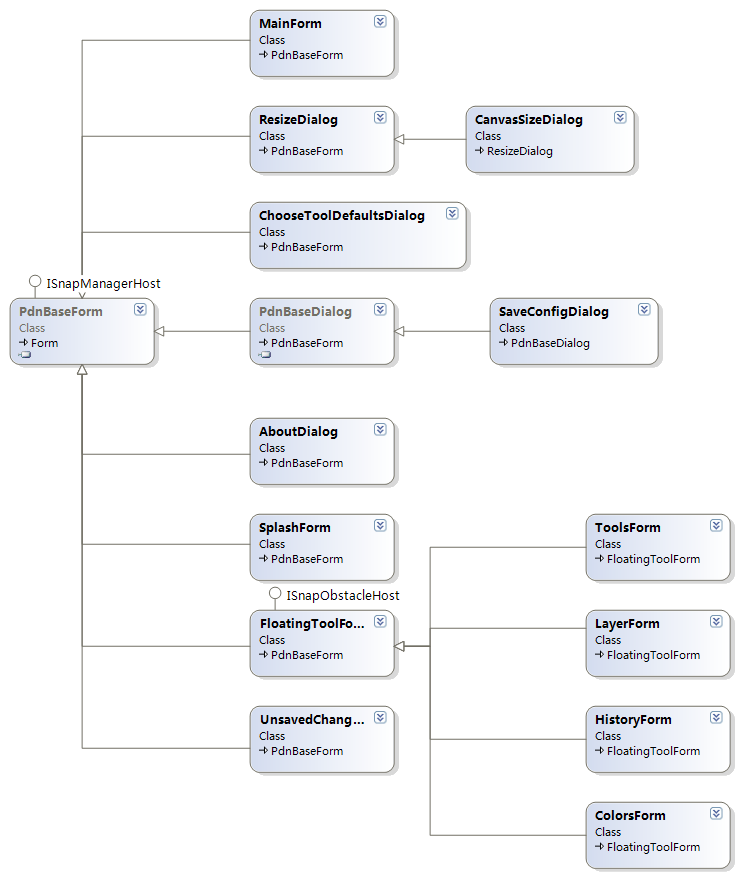
ToolsForm内部包含ToolsControl, 后者包含各种Tool的toolStripEx. 再在toolStripEx中添加各种工具的button1
2
3
4
5
6
7
8
9
10
11
12
13
14
15
16
17
18
19
20
21
22
23
24
25
26
27
28
29
30
31
32
33
34
35
36
37
38
39
40
41
42
43
44
45
46
47
48
49
50
51
52
53
54
55
56
57
58
59
60
61
62
63
64
65
66
67
68
69
70
71
72
73
74
75
76 internal class ToolsControl
: UserControl,
IToolChooser
{
private ToolStripEx toolStripEx;
//添加tool button
public void SetTools(ToolInfo[] toolInfos)
{
if (this.toolStripEx != null)
{
this.toolStripEx.Items.Clear();
}
this.imageList = new ImageList();
this.imageList.ColorDepth = ColorDepth.Depth32Bit;
this.imageList.TransparentColor = Utility.TransparentKey;
this.toolStripEx.ImageList = this.imageList;
ToolStripItem[] buttons = new ToolStripItem[toolInfos.Length];
string toolTipFormat = PdnResources.GetString("ToolsControl.ToolToolTip.Format");
for (int i = 0; i < toolInfos.Length; ++i)
{
ToolInfo toolInfo = toolInfos[i];
ToolStripButton button = new ToolStripButton();
int imageIndex = imageList.Images.Add(
toolInfo.Image.Reference,
imageList.TransparentColor);
button.ImageIndex = imageIndex;
button.Tag = toolInfo.ToolType;
button.ToolTipText = string.Format(toolTipFormat, toolInfo.Name, char.ToUpperInvariant(toolInfo.HotKey).ToString());
buttons[i] = button;
}
this.toolStripEx.Items.AddRange(buttons);
}
// 增加tool按钮的点击事件
private void ToolStripEx_ItemClicked(object sender, ToolStripItemClickedEventArgs e)
{
foreach (ToolStripButton button in this.toolStripEx.Items)
{
button.Checked = (button == e.ClickedItem);
}
OnToolClicked((Type)e.ClickedItem.Tag);
}
public event ToolClickedEventHandler ToolClicked;
protected virtual void OnToolClicked(Type toolType)
{
if (this.ignoreToolClicked <= 0)
{
if (ToolClicked != null)
{
ToolClicked(this, new ToolClickedEventArgs(toolType));
}
}
}
}
internal class ToolInfo
{
private string name;
private string helpText;
private ImageResource image;
private bool skipIfActiveOnHotKey;
private char hotKey;
private Type toolType; //具体的工具类型
private ToolBarConfigItems toolBarConfigItems;
}
各种tool如下所示: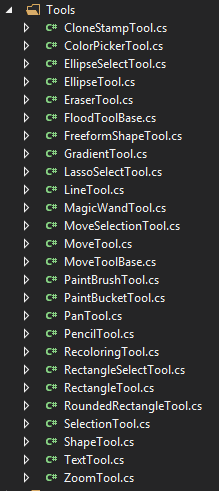
ToolClicked事件是在AppWorkspace的构造方法中被监听的1
2
3
4
5
6
7
8
9
10
11
12
13
14
15
16
17
18
19
20
21
public AppWorkspace()
{
	SuspendLayout();

	// initialize!
	InitializeComponent();
	InitializeFloatingForms();

	this.mainToolBarForm.ToolsControl.SetTools(DocumentWorkspace.ToolInfos);
	this.mainToolBarForm.ToolsControl.ToolClicked += new ToolClickedEventHandler(this.MainToolBar_ToolClicked);
}

private void MainToolBar_ToolClicked(object sender, ToolClickedEventArgs e)
{
	if (ActiveDocumentWorkspace != null)
	{
		ActiveDocumentWorkspace.Focus();
		ActiveDocumentWorkspace.SetToolFromType(e.ToolType);
	}
}
然后转移到ActiveDocumentWorkspace1
2
3
4
5
6
7
8
9
10
11
12
13
14
15
16public void SetToolFromType(Type toolType)
{
if (toolType == GetToolType())
{
return;
}
else if (toolType == null)
{
SetTool(null);
}
else
{
Tool newTool = CreateTool(toolType);
SetTool(newTool);
}
}
SetTool内部会调用Tool的PerformActivate方法, 并将该tool设为activeTool1
2
3
4
5// Methods to send messages to this class
public void PerformActivate()
{
Activate();
}
Activate方法又会调用OnActivate方法, 后者是一个虚方法, 由子类去实现, 这里以PencilTool为例(看了一圈, PencilTool这个最简单)1
2
3
4
5
6
7
8
9
10
11
12
13
14
15
16
17
18
19
20
21
22
23
24
25
26protected override void OnActivate()
{
base.OnActivate();
this.pencilToolCursor = new Cursor(PdnResources.GetResourceStream("Cursors.PencilToolCursor.cur"));
this.Cursor = this.pencilToolCursor; //改变鼠标形状
this.savedRects = new List<Rectangle>();
if (ActiveLayer != null)
{
bitmapLayer = (BitmapLayer)ActiveLayer;
renderArgs = new RenderArgs(bitmapLayer.Surface);
tracePoints = new List<Point>();
}
else
{
bitmapLayer = null;
if (renderArgs != null)
{
renderArgs.Dispose();
renderArgs = null;
}
}
}
PencilTool被激活后, 用户用鼠标在activeDocumentWorkspace上绘图. 鼠标事件如何传递到PencilTool? 看下面的代码1
2
3
4
5
6
7
8
9
10
11
12
13
14
15
16
17
18//AppWorkspace.cs
protected virtual void OnActiveDocumentWorkspaceChanged()
{
this.activeDocumentWorkspace.DocumentMouseEnter += this.DocumentMouseEnterHandler;
this.activeDocumentWorkspace.DocumentMouseLeave += this.DocumentMouseLeaveHandler;
this.activeDocumentWorkspace.DocumentMouseMove += this.DocumentMouseMoveHandler;
this.activeDocumentWorkspace.DocumentMouseDown += this.DocumentMouseDownHandler;
//...
//...
}
private void DocumentMouseMoveHandler(object sender, MouseEventArgs e)
{
if (ActiveDocumentWorkspace.Tool != null)
{
ActiveDocumentWorkspace.Tool.PerformMouseMove(e); // ActiveDocumentWorkspace.Tool为activeTool
}
}
再到Tool类1
2
3
4
5
6
7
8
9
10
11
12
13
14
15
16
17
18
19
20
21public void PerformMouseMove(MouseEventArgs e)
{
if (IsOverflow(e))
{
return;
}
if (e is StylusEventArgs)
{
if (this.SupportsInk)
{
StylusMove(e as StylusEventArgs);
}
// if the tool does not claim ink support, discard
}
else
{
MouseMove(e);
}
}
MouseMove被PencilTool重写, 内部调用DrawLines方法, 后者调用DrawPoint方法1
2
3
4
5
6
7
8
9
10
11
12// Draws a point, but first intersects it with the selection
private void DrawPoint(RenderArgs ra, Point p, ColorBgra color)
{
if (ra.Surface.Bounds.Contains(p))
{
if (ra.Graphics.IsVisible(p))
{
BinaryPixelOp op = AppEnvironment.AlphaBlending ? blendOp : copyOp;
ra.Surface[p.X, p.Y] = op.Apply(ra.Surface[p.X, p.Y], color);
}
}
}
最后在看一下DocumentWorkspace初始化ToolInfo1
2
3
4
5
6
7
8
9
10
11
12
13
14
15
16
17
18
19
20
21
22
23
24
25
26
27
28
29
30
31
32
33
34
35
36
37
38
39
40
41
42
43
44
45
46
47
48
49
50//DocumentWorkspace.cs
private static void InitializeTools()
{
// add all the tools
tools = new Type[]
{
typeof(RectangleSelectTool),
typeof(MoveTool),
typeof(LassoSelectTool),
typeof(MoveSelectionTool),
typeof(EllipseSelectTool),
typeof(ZoomTool),
typeof(MagicWandTool),
typeof(PanTool),
typeof(PaintBucketTool),
typeof(GradientTool),
typeof(PaintBrushTool),
typeof(EraserTool),
typeof(PencilTool),
typeof(ColorPickerTool),
typeof(CloneStampTool),
typeof(RecolorTool),
typeof(TextTool),
typeof(LineTool),
typeof(RectangleTool),
typeof(RoundedRectangleTool),
typeof(EllipseTool),
typeof(FreeformShapeTool),
};
}
private static void InitializeToolInfos()
{
int i = 0;
toolInfos = new ToolInfo[tools.Length];
foreach (Type toolType in tools)
{
using (Tool tool = DocumentWorkspace.CreateTool(toolType, null))
{
toolInfos[i] = tool.Info;
++i;
}
}
}